Metro 2 Segments Explained in Plain English
A clear, jargon-free breakdown of every Metro 2 segment — what each one does, what fields it contains, and what happens when you get it wrong. Written for lenders, servicers, and compliance teams who need to understand the format without a computer science degree.
What Is a Metro 2 File?
A Metro 2 file is a structured text file that data furnishers (lenders, servicers, debt collectors, and others who extend credit) submit to the credit bureaus each month. It contains one Base Segment for each consumer account you are reporting. The file follows a strict format defined by the Consumer Data Industry Association (CDIA) in the Credit Reporting Resource Guide® (CRRG®).
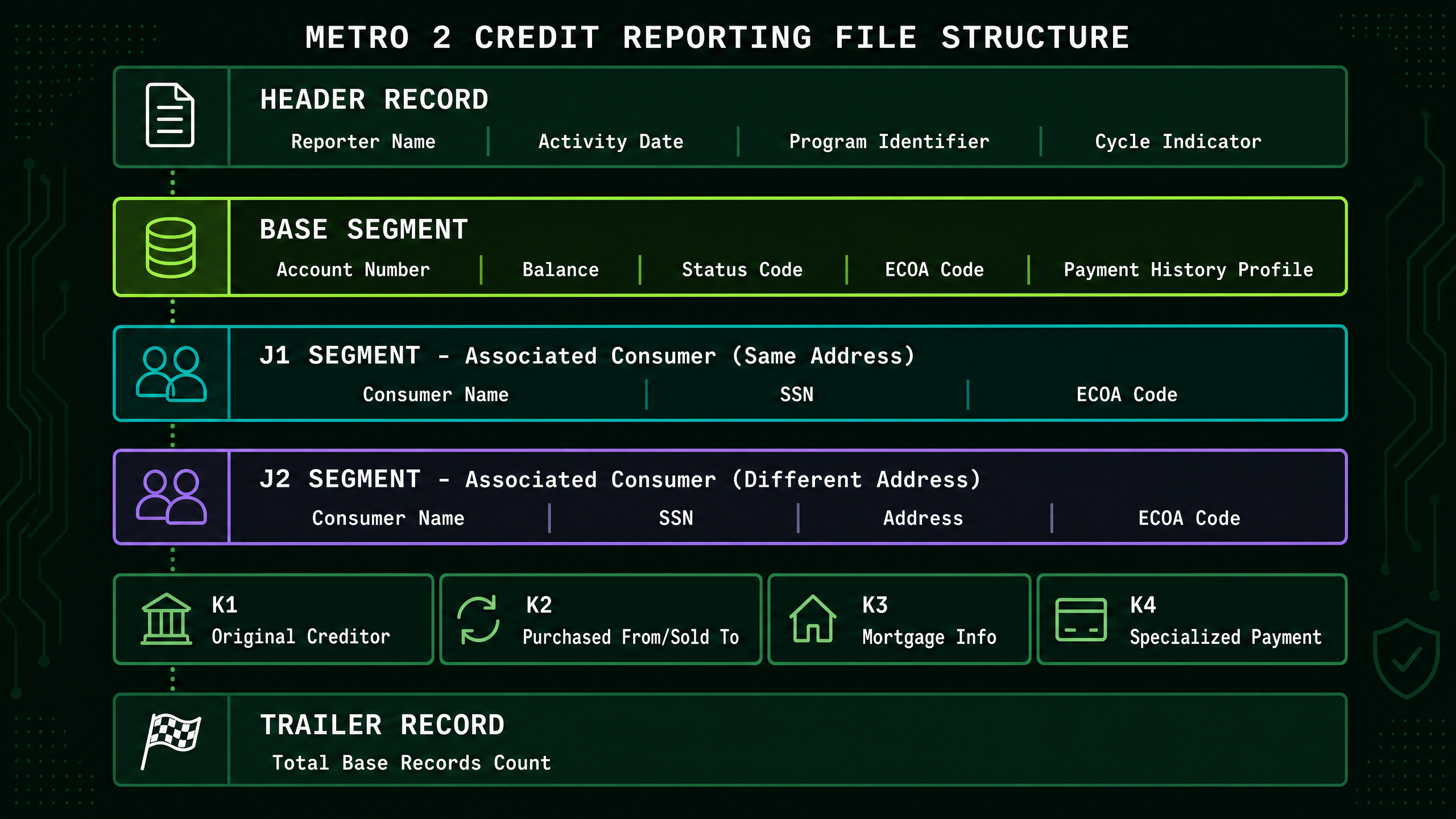
The file is organized into segments — different types of records, each with a specific purpose. Every Metro 2 file must start with a Header Record, contain one Base Segment per account, and end with a Trailer Record. Additional segments (J1, J2, K1–K4) are added as needed for specific account types and associated consumers.
File structure at a glance: Header → [Base + optional J1/J2/K-Segments] × number of accounts → Trailer
Note: The Header identifies the reporter and reporting period. The Trailer contains the Base Segment count. J1 = associated consumer at same address. J2 = associated consumer at different address.
Header Record
Required — first record in every fileThe first record in every Metro 2 file. It identifies who you are and what reporting period this file covers. The Header does NOT contain a count of accounts — that information belongs in the Trailer Record.
💡 Think of the Header Record as the cover page of a report. It tells the bureau: 'This file is from ABC Lending, covering January 2025.' It does not tell the bureau how many accounts are inside — that is the Trailer's job.
Key Fields
Common Errors to Avoid
- !Activity Date in wrong format (YYYYMMDD instead of MMDDYYYY)
- !Reporter Name doesn't match the name on your data furnisher agreement
- !Missing or incorrect Program Identifier (your unique bureau ID)
- !Program Date is older than 12 months (indicates outdated software)
- !Assuming the Header contains an account count — it does not; account counts belong in the Trailer Record
Base Segment
Required — one per accountThe core record for each account you are reporting. Every consumer account gets one Base Segment. This is where the actual credit data lives — account status, balance, payment history, and consumer identity. The Base Segment is distinct from the J1 Segment: the Base Segment identifies the primary account holder, while J1 is a separate supplemental segment for an associated consumer at the same address.
💡 If the Header is the cover page, the Base Segment is the individual account record card. One card per account. It contains everything the bureau needs to know about that specific account and the primary consumer who owns it.
Key Fields
Common Errors to Avoid
- !Account Status code doesn't match the Payment History Profile (e.g., Status 11/Current but history shows recent lates)
- !Balance is non-zero on a fully paid account
- !SSN contains dashes or spaces
- !Date Opened changes between monthly submissions
- !Using an invalid ECOA Code — only 1, 2, 5, 7, T, X, Z are valid in the Base Segment
- !Confusing the Base Segment with the J1 Segment — the Base Segment is the primary account record; J1 is a separate supplemental segment
- !Payment History Profile length is not exactly 24 characters
J1 Segment — Associated Consumer (Same Address)
Optional — associated consumer at same addressThe J1 Segment is used to report an associated consumer who lives at the same address as the primary consumer on the account. It is a separate record from the Base Segment and follows the Base Segment it belongs to. Use J1 for joint account holders, co-signers, or authorized users who share the same address as the primary borrower.
💡 If the primary borrower and their spouse both live at 123 Main Street and are both on the loan, the primary borrower gets the Base Segment and the spouse gets a J1 Segment — because they share the same address.
Key Fields
Common Errors to Avoid
- !Using J1 when the associated consumer lives at a different address — use J2 instead
- !Reporting a J1 Segment for an account with ECOA Code 1 (Individual) in the Base Segment
- !Using an invalid ECOA Code in J1 — only 1, 2, 3, 5, 7, T, X, Z are valid
- !Confusing J1 (same address) with J2 (different address)
J2 Segment — Associated Consumer (Different Address)
Optional — associated consumer at different addressThe J2 Segment is used to report an associated consumer who lives at a different address from the primary consumer on the account. Like J1, it follows the Base Segment it belongs to. Use J2 when the co-borrower, co-signer, or authorized user has a different mailing address than the primary account holder.
💡 If the primary borrower lives at 123 Main Street but their co-signer lives at 456 Oak Avenue, the co-signer gets a J2 Segment — because they live at a different address than the primary borrower.
Key Fields
Common Errors to Avoid
- !Using J2 when the associated consumer lives at the same address as the primary — use J1 instead
- !Missing J2 Segment for a joint account where the co-borrower has a different address
- !Using an invalid ECOA Code in J2 — only 1, 2, 3, 5, 7, T, W, X, Z are valid (note: W is valid in J2 but not in J1)
- !Omitting the address fields in J2 (required since the address differs from the Base Segment)
K-Segments (Supplemental Data)
SituationalK-Segments provide additional account information that doesn't fit in the Base Segment. There are four K-Segments, each for a specific purpose. Not all accounts require K-Segments.
💡 K-Segments are like attachments to a form. The main form (Base Segment) covers most situations, but some accounts need extra pages for specific details.
Key Fields
Common Errors to Avoid
- !Omitting K1 Segment when reporting a collection account, debt buyer account, or student loan guaranty account
- !Using K2 to report the original creditor name — K2 is for purchased/sold portfolio tracking, not original creditor identity
- !Including K3 Segment on a non-mortgage account
- !Omitting K4 when reporting accounts with deferred payments or balloon payment structures
- !Incorrect original creditor name or classification in K1 (causes account matching failures at the bureau)
Trailer Record
Required — last record in every fileThe last record in the Metro 2 file. It contains the total count of Base Segments being reported, so the bureau can verify the file was received completely and without corruption.
💡 The Trailer Record is like the last page of a legal document that says 'This document contains 340 accounts.' If the bureau receives a file where the Trailer says 340 Base Segments but they only counted 339, they know something went wrong in transmission.
Key Fields
Common Errors to Avoid
- !Including the Header and/or Trailer in the Record Count — the Record Count contains Base Segments ONLY
- !Setting Record Count to the total number of all records in the file (including Header and Trailer) — this is incorrect
- !Missing Trailer Record entirely (file appears truncated to the bureau)
- !Populating Block Count incorrectly — only use this field if your bureau agreement requires block-level organization; otherwise leave it as specified in your agreement
Aligned with the Current CRRG® Specification
This guide reflects the current edition of the Credit Reporting Resource Guide® (CRRG®) published by the Consumer Data Industry Association (CDIA). The CRRG® is updated periodically — Hutchins Systems monitors all updates and ensures our Metro 2 software (Credit Time 2000©, e-CreditTime, and MORFi) is always aligned with the latest specification. Our built-in compliance audit engine validates every field in every segment before your file reaches the bureau.
Compatible with All Four National Credit Bureaus
Ready to Generate Compliant Metro 2 Files?
Our Metro 2 software validates every segment and field before submission. Book a free consultation with our experts.